
Refari Built Websites
How to add a video as a background in your sections
https://help.refari.work/knowledge-base/article/how-to-add-a-video-as-a-background-in-your-sections
Background videos can be a great way to improve your website's look, make it more enjoyable for visitors, and command attention. Thankfully, you can add video backgrounds to your page with ease.
Here’s how you can add video backgrounds in your sections:
Go to the page where you want to add a video background and Edit the page by simply clicking the “Edit with Elementor” button
Select the section and go to Style > Background. Change the background type in the background settings to a video. See screenshot below.

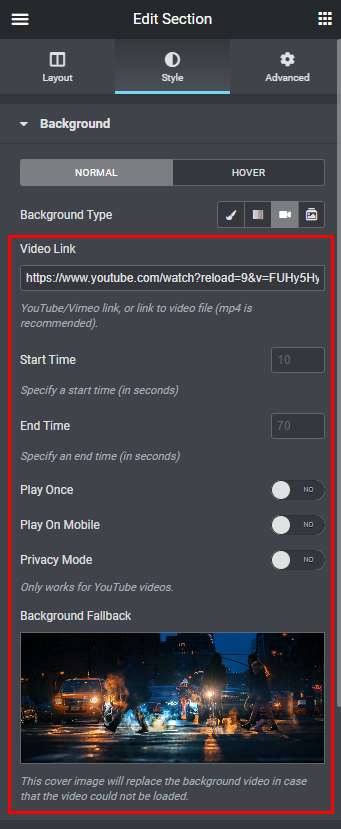 Once you change the background type to a video paste the link of the video you want to add in the video link field and you’re all set!
You can also set the “Start time and End time” of the video if you want to cut some parts at the beginning or end of the video.
Also, you can choose whether to play the video on mobile and tablet and as well as play the video only once.
Another option is to add a “Background Fallback” this is a background image placeholder that appears in your sections while the video background is still loading.