
Refari Built Websites
How to add entrance animations in your images, texts, buttons and sections
https://help.refari.work/knowledge-base/article/how-to-add-entrance-animations-in-your-images-texts-buttons-and-sections
The Entrance Animations feature lets you animate your Widgets, Sections, and Columns. This way, as your site visitor scrolls down the page, the elements appear with an entrance animation.
Here’s how to add entrance animations on your elements:
Select one element in your page that you want to have entrance animation.
In this example we will add entrance animation on a heading. To add simple go to the elements: Advance Tab > Motion Effects Tab

Then in the entrance animation dropdown you can select what animation you want to set for the
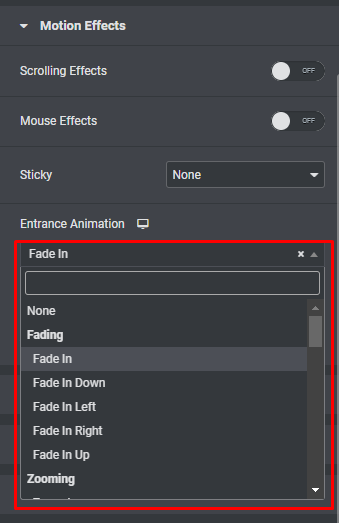 elements.
You can choose from 37 different entrance animations including:
Fading: Fade in, fade in up, down, left, right
Zooming: Zoom in, zoom in up, down, left, right,
Bouncing: Bounce in, bounce in up, down, left, right
Sliding: Slide in up, down, left, right
Rotating: Rotate in, rotate in down left, down right, up left, up right
Attention seekers: Bounce, flash, pulse, rubber band, shake, head shake, swing, tada, wobble, jello
Light speed: Light speed in
Specials: Roll in