
TopRec
Setting up your Google review link for TopRec
https://help.refari.work/knowledge-base/article/setting-up-your-google-review-link-for-toprec
Sign into Google My Business if you have not set up your Google My Business page, set one up!
You really do want one!
Next go to info and set up a "google short name," this is shown as an "@" sign. Here is the official documentation from Google. Create a short name and URL for your business
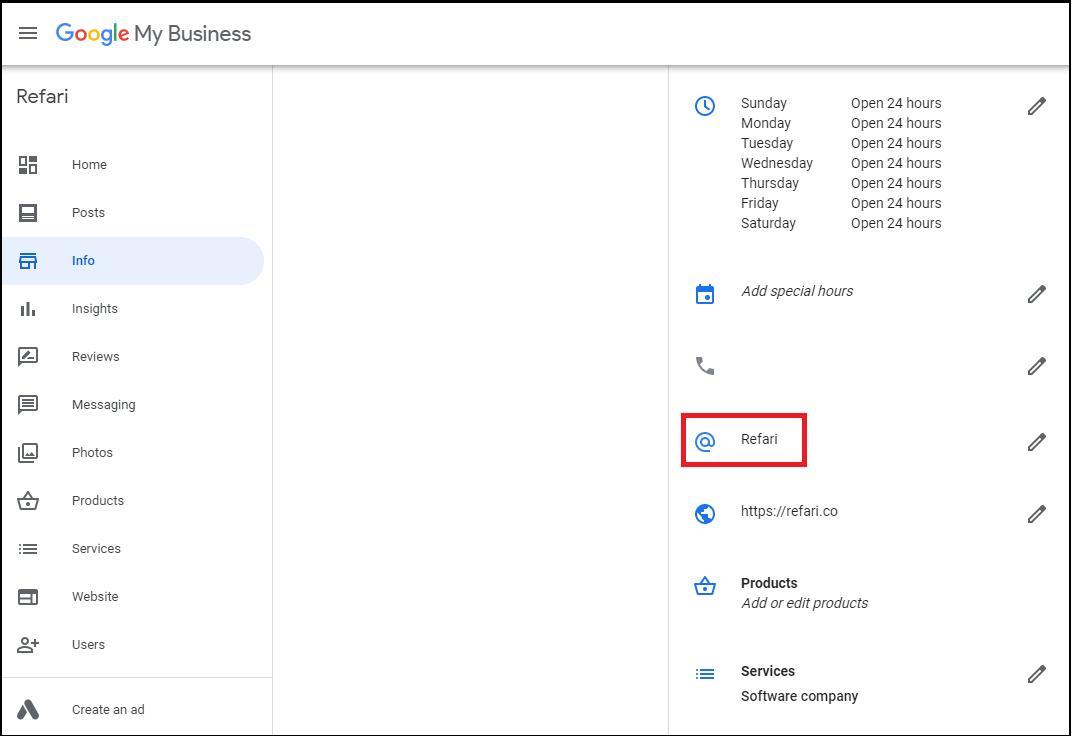
Once you have a google short name, google will automatically create a short url for your business.
Yours will be https://g.page/<yourgoogleshortname>/
For example ours is https://g.page/refari/
To turn this into a review URL , we simply need to append 'review' to the end of this.
Yours will be https://g.page/<yourgoogleshortname>/review/
For example ours is https://g.page/refari/review
Note you need to be Company admin to be able to access this section.
Finally navigate to referrer.io website then navigate to settings, company settings, input your google review link into the field called Google review URL in your referrer settings page.