
Refari
How to get your Job Adverts aggregated by Indeed
https://help.refari.work/knowledge-base/article/how-to-get-your-job-adverts-aggregated-by-indeed
This article explains how to get your Refari job adverts aggregated by Indeed, so your live roles show up in Indeed's search results and drive more traffic back to your Refari job board. Aggregation simply means Indeed collecting your jobs automatically from a feed you provide, rather than you posting each role to Indeed by hand.
How Indeed aggregation works
Refari automatically builds a purpose-made XML feed for your account, a machine-readable list of all your live jobs that Indeed can read. Getting set up is a two-step process, and the second step happens on your side rather than ours:
- Copy your Indeed XML feed link from Refari.
- Email Indeed and ask them to aggregate that feed.
Once Indeed accepts the feed, they collect your jobs from it periodically, so new roles flow through to Indeed without any extra work from you.
Step 1: Copy your Indeed XML feed link
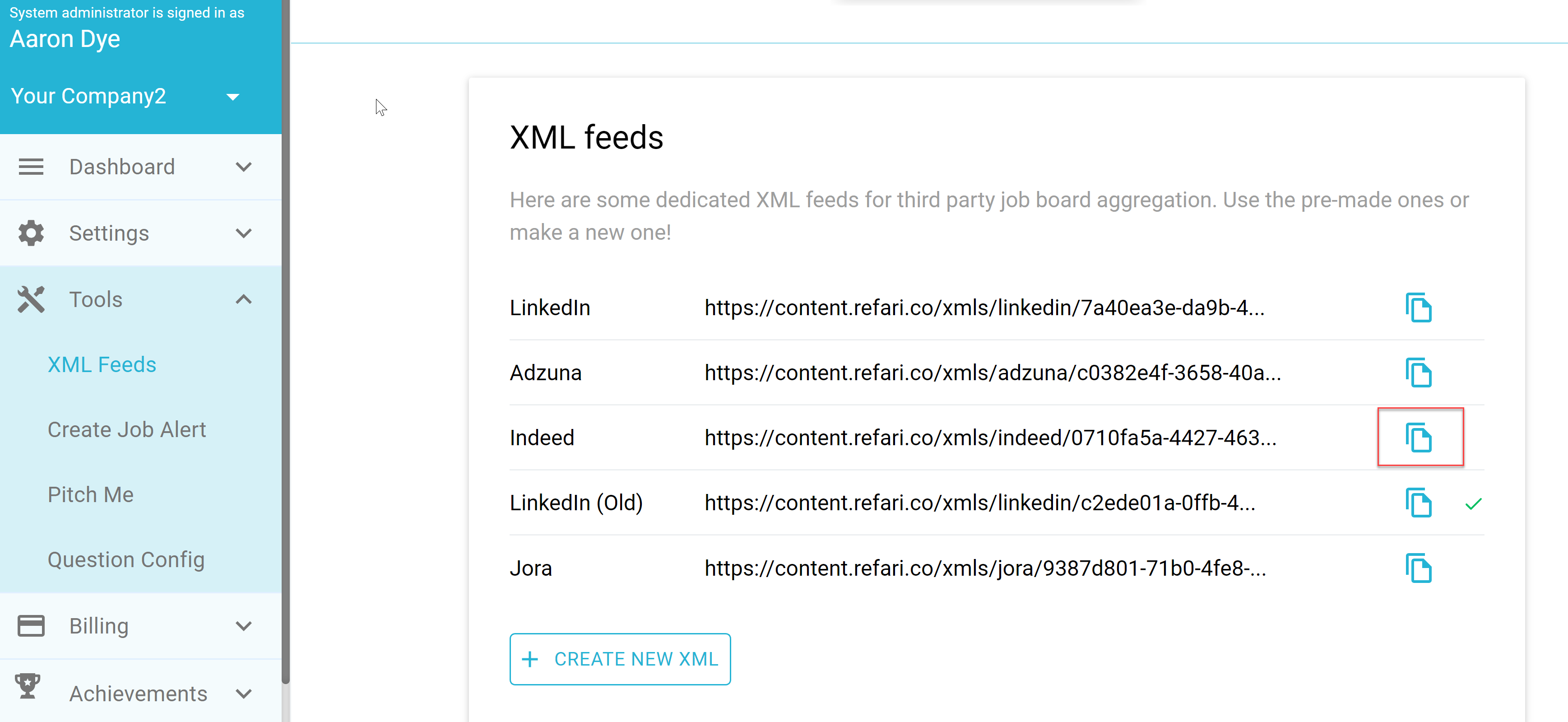
In your Refari dashboard, go to Tools > XML Feeds. You will see a dedicated feed for each major job board. Find the Indeed row and click the copy icon on the right to copy its feed link.
Step 2: Email Indeed to request aggregation
Send a short email to employer-support@indeed.com asking them to aggregate your feed, and paste in the feed link you just copied. Something like this works well:
Hi Indeed,

Would you please be able to aggregate our job adverts from this purpose-built XML feed for Indeed aggregation?

Here is the link to the XML feed: <paste your Indeed feed link here>

Many thanks
Final Notes
Because Indeed collects from the feed on their own schedule, it can take a little time after they accept it before your jobs start appearing. Once it is live, you can control which of your jobs are included in this feed (and other aggregator feeds) using the Manage Job Distribution feature, linked below.